


Software and Hardware Training
Huntron provides training for our products through classes at the Huntron factory, online courses, self-paced training courses or on-site at your location. We cover Huntron Trackers, Huntron Access Probers and Huntron Workstation use.
-
Huntron Factory Training Workshop
Two day training course at the Huntron factory covering Analog Signature Analysis (ASA) and Tracker/Prober test development using Huntron Workstation. -
Online Training
The Huntron Tracker Training Series - Analog Signature Analysis, an online course that covers ASA in depth and includes its use in troubleshooting printed circuit boards.
Visit Huntron Learning -
Huntron ASA Self-paced Training Course
This is a self-paced course utilizing a training PCB and course workbook that focuses on the basics of Analog Signature Analysis. -
Huntron Tutorials
Links to tutorials covering Huntron Workstation use with Trackers and Probers.
Huntron Factory Training Workshop in Mill Creek, WA
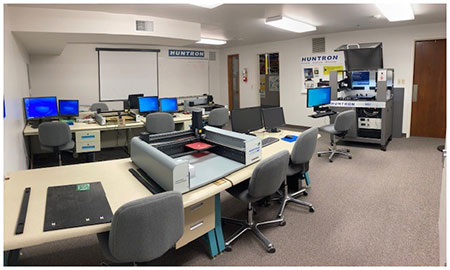
This course covers the effective use of the software controlled Huntron Trackers and Access Probers as a troubleshooting
tools as well as the development of basic test routines.
Included is plenty of hands on experience and
students are requested to bring samples of the same type of printed circuit board
(1 good and 2 defective; more if possible) so they may learn troubleshooting techniques and develop test programs on familiar PCBs.
A working knowledge of the Windows OS is essential.
The class lasts two days and students are responsible for their transportation, meals (Huntron provides lunch on class days)
and lodging expenses.
Classes begin at 8:00am and end at 3:30pm.
Cost is $395.00 per student.
No charge for up to two people with the purchase of a Robotic Prober system.
(Good for up to six months after purchase).
NOTE:
The Huntron Factory Training Workshop will be conducted using the latest version Huntron Workstation only.
Register for Training Class
Available Huntron Factory Training Workshop Dates *
- June Full, 2026
- July Full, 2026
- August Full, 2026
- September 15-16, 2026
- October 13-14, 2026
* Registering for a class does not guarantee that you will have a spot in the selected class.
Classes are limited in size and the number of available seats can change.
Huntron will send you a confirmation when your spot is reserved.
Directions from Seattle-Tacoma International Airport (SEA) and local hotel list
Class Agenda:
-
Day 1
- Signature Analysis Theory
- Hardware: Trackers, Scanners, Probers
- Introduction to Huntron Workstation
- Lunch break
- Test Creation Workshop using Huntron Trackers and Access Probers (hands-on PCB test development)
-
Day 2
- Huntron Workstation software features
- Test Creation Workshop continued
- Lunch break
- Test Creation Workshop wrap-up
- Advanced Huntron Workstation features
Huntron Tracker Training Series - Analog Signature Analysis

This online course is an in-depth study of the widely used testing method of ASA (Analog Signature Analysis).
The course expects that the student has some knowledge of electronics but should cover the basics
for the purposes of completing this course.
While this course does illustrate ASA using Huntron's Tracker technology, the purpose of this course is to cover ASA,
not the use of specific Huntron Trackers.
There are 13 lessons in total, and they are designed to be completed in order.
Each lesson is presented as a single webpage consisting of a video lesson, quiz, video transcript,
lesson summary, and extra resources depending on the context.
Course completion takes approximately 2-3 hours.
Visit Huntron Learning to learn more about this valuable online training resource.
Huntron ASA Self-paced Training Course
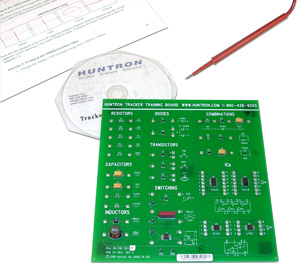
The Huntron Analog Signature Analysis (ASA) Training Course takes you through theory and all phases of
troubleshooting using Tracker Analog Signature Analysis.
It is designed to help train users new to ASA.
The course utilizes a custom designed printed circuit board (PCB) with step-by-step workbook exercises
that will teach technicians at all skill levels how to integrate ASA as a new tool for their diagnostic workbench.
The training course consists of a CD with the printable workbook, and the Huntron Tracker Trainer PCB.
This course is suitable for all variable range Trackers including the
Tracker 3200S
,
Tracker 2800/2800S
,
Tracker Model 30
* ,
TrackerPXI
* , Tracker 2700/2700S, ProTrack and Tracker 4000.
Huntron ASA Training Course Part number: 98-0515
Buy Now
* Tracker Model 30 and TrackerPXI are used with the Huntron Workstation software.
Huntron Tutorials
For your convenience, here are direct links to the available Huntron Tutorials. These are a great first resource to help you learn the use of Huntron Workstation.
- Huntron Workstation 4.3 Tutorial - Full tutorial for using Huntron Workstation 4.3 including Access Probers
- Huntron Workstation Access RF Tutorial - Full tutorial for using Huntron Workstation 4.3 with the Access RF Prober
- Tracker 3200S Tutorial - Tutorial on Huntron Workstation use specifically for the Tracker 3200S without Prober
- Tracker Model 30 Tutorial - Tutorial on Huntron Workstation use specifically for the Tracker Model 30 without Prober
- CAD Import Tutorial for Workstation 4.3 - Tutorial covering the import of CAD layout data into Huntron Workstation using Unisoft ProntoView-Markup.
- Tracker 2800 Workstation Tutorial - Tutorial covering the use of a Tracker 2800/2800S with Huntron Workstation
- Huntron Workstation Tutorial for LCR Meter - Tutorial guiding you through using the Keysight E4980AL LCR meter in Huntron Workstation.
- Huntron Workstation Tutorial for DMMs - Tutorial guiding you through using supported digital multimeters in Huntron Workstation.
- Huntron Workstation Tutorial for Oscilloscopes - Tutorial guiding you through using supported oscilloscopes in Huntron Workstation.
- HAT File Import Tutorial - Tutorial covering how to create and import a Huntron ASCII Text file to add Component Sequences to a Board in Huntron Workstation. Download the Huntron HAT File Template (Excel .XLSX) used in the tutorial.
- Huntron Workstation Tutorial for 4.2 versions - Full tutorial for using Huntron Workstation version 4.2 including Access Probers
- CAD Import Tutorial for Workstation 4.2/4.1 - Tutorial covering the import of CAD layout data into Huntron Workstation using CAMCAD Pro.